Published November 11, 2026. This feature is in beta and changing quickly. I'll update this post as OpenAI adds to it.
Your customers are already asking ChatGPT about businesses like yours. "Who's a good plumber in Hoover?" "Best lunch spot near Five Points South?" "Which lawn care companies in Birmingham do weekly service?" Until this week, you could only influence the answer indirectly, through your website and the listings ChatGPT reads. You had no direct way to correct it.
That just changed. On November 10, OpenAI launched Businesses in ChatGPT, which lets a business owner claim a verified profile inside ChatGPT, correct their details, and see how often ChatGPT mentions them. If you've ever claimed a Google Business Profile, the idea will feel familiar.
It's free, it takes a few minutes to start, and almost nobody has done it yet. Here's what it is, how to claim yours, and what to do after you do.
What OpenAI Launched
Businesses in ChatGPT has three parts:
- Business profiles. A claimed, verified listing for your business inside ChatGPT. Verified profiles get a blue checkmark, which tells people the profile is managed by the real business and not pieced together from around the web.
- Business Hub. The dashboard where you manage your profile and see your numbers: how often ChatGPT mentions you, how many people view your profile, how many click through to your website, and the top topics people were asking about when you came up.
- Business Agents. An AI assistant for your business that answers customer questions about your products and policies, using information you provide. At launch, these are only for eligible U.S. e-commerce and online service businesses.
Claiming a profile, managing it in Business Hub, and publishing a Business Agent are all free at launch.
Why This Matters for Local Businesses
OpenAI says ChatGPT now reaches about 1.2 billion people a week. A growing share of them use it the way they used to use Google: to find someone to hire, somewhere to eat, or something to buy.
When someone asks ChatGPT for a recommendation, it doesn't hand them ten blue links. It gives them a short answer with a few names in it. If you're not one of those names, you don't get a second chance on page two.
Until now, ChatGPT built its picture of your business from whatever it could find: your website, your Google listing, directories, reviews, old articles. If your hours changed, you moved, or you added a service, ChatGPT could be telling people outdated information, and you'd never know. A claimed profile gives you a way to set the record straight and a dashboard that shows whether ChatGPT is sending you customers.
How to Claim Your Business in ChatGPT: Step by Step
You'll need a ChatGPT account, and you must be the owner or someone authorized to represent the business.
1. Go to Business Hub
Sign in to ChatGPT, then go to chatgpt.com/business-hub. If you have a work account, sign in with that one, since it will become the admin account for your business profile.
2. Search for your business
Type your business name. If ChatGPT already knows about you, your business will show up in the suggestions, matched by street address. Pick it. If you're not listed, you can enter your business details and create a new listing.
3. Click "Get Started" and choose your admin account
Follow the prompts and confirm which ChatGPT account should manage the business. That account is the one that will be able to edit the profile and see your numbers, so use an account your business controls, not a personal one an employee might take with them.
4. Verify that the business is yours
Depending on your business, OpenAI will verify your claim using one of these:
- A text or phone call to your main business phone number
- Your business email address
- Your website domain (adding a DNS record to your domain settings)
- Your Shopify account, if you sell through Shopify
Use the same phone number and address that appear on your website and Google Business Profile. Mismatches slow verification down.
5. Wait for the review
Your claim moves through "Claim received" and then "Review in progress." OpenAI emails you with the decision. You can withdraw a claim while it's under review if you made a mistake.
6. Complete the identity check
Once the claim is approved, the person managing the listing has to pass a separate identity check through Persona, using a government-issued ID. You can't edit your profile, see your analytics, connect a product feed, or create an agent until this step is done, so don't skip it. When it's approved, your blue checkmark appears.
7. Ridgeway Web clients: add us as a Business Admin
If you're on a Ridgeway Web monthly plan, invite jim@ridgewayweb.com as a Business Admin on your profile once you're verified. That's all we need to take it from there.
What to Do After You Claim Your Profile
Claiming is the first step, not the finish line. Here's where to spend your time once you're in:
Make your details match everywhere. Your business name, address, phone number, hours and website should be identical on ChatGPT, your Google Business Profile, your website, Facebook and the major directories. AI assistants cross-check sources, and inconsistent information makes any one source harder to trust. (This is the same "NAP consistency" rule from our Google Business Profile optimization guide, and it matters even more now.)
Write a clear description. Say what you do, who you do it for, and where, in plain words. "Family-owned HVAC repair and installation serving Hoover, Vestavia Hills and Pelham" tells an AI exactly when to recommend you. "Your comfort is our passion" tells it nothing.
Add your products, if you sell them. Retailers can upload a product feed with prices and stock levels, or connect a Shopify store to keep it in sync. ChatGPT can use that information to answer shoppers' questions directly.
Check Business Hub monthly. Look at the top discovery topics. They show what people were asking about when ChatGPT mentioned you, which is a direct look at how customers think about your business. If a topic keeps coming up and your website doesn't cover it, that's your next page or blog post.
A couple of things to know about the numbers: metrics only appear once you pass a minimum amount of activity, so a new or small business may see blanks for a while. And OpenAI notes that a "click" doesn't confirm that someone actually landed on your website. Use your own website analytics to see who arrives.
What Claiming Your Profile Won't Do
I want to be straight with you here, because there will be plenty of hype about this.
OpenAI says ChatGPT will keep making independent recommendations, and that claiming a profile does not guarantee better placement or more sales. There's no "pay to rank" button. ChatGPT still decides who to recommend based on what it can find and trust about you.
That's actually good news for small businesses. It means the business with the clearest, most consistent, best-reviewed presence across the web has a real shot against bigger competitors with bigger budgets. A claimed profile is one piece of that. The rest is the same work that has always won customers online.
How ChatGPT Decides Which Businesses to Recommend
Beyond your profile, here's what helps an AI assistant understand and trust your business:
- A website that says clearly what you do and where you do it. Separate pages for each service and each area you serve, written in plain language. Thin sites with one vague "Services" page are hard for AI to recommend for anything specific.
- Structured data (schema markup). Code on your website that labels your business name, address, hours, services and reviews in a format machines read directly. We cover it in our local schema markup guide.
- A fully optimized Google Business Profile. It's still a major source of business information across the web, and AI tools lean on it heavily.
- Reviews, and responses to them. Recent, detailed reviews on Google and other platforms show you're active and trusted.
- A fast, crawlable website. If an AI crawler can't load your pages, or your content is hidden behind heavy scripts, your site can't vouch for you. This is one reason we hand-code our websites instead of using page builders.
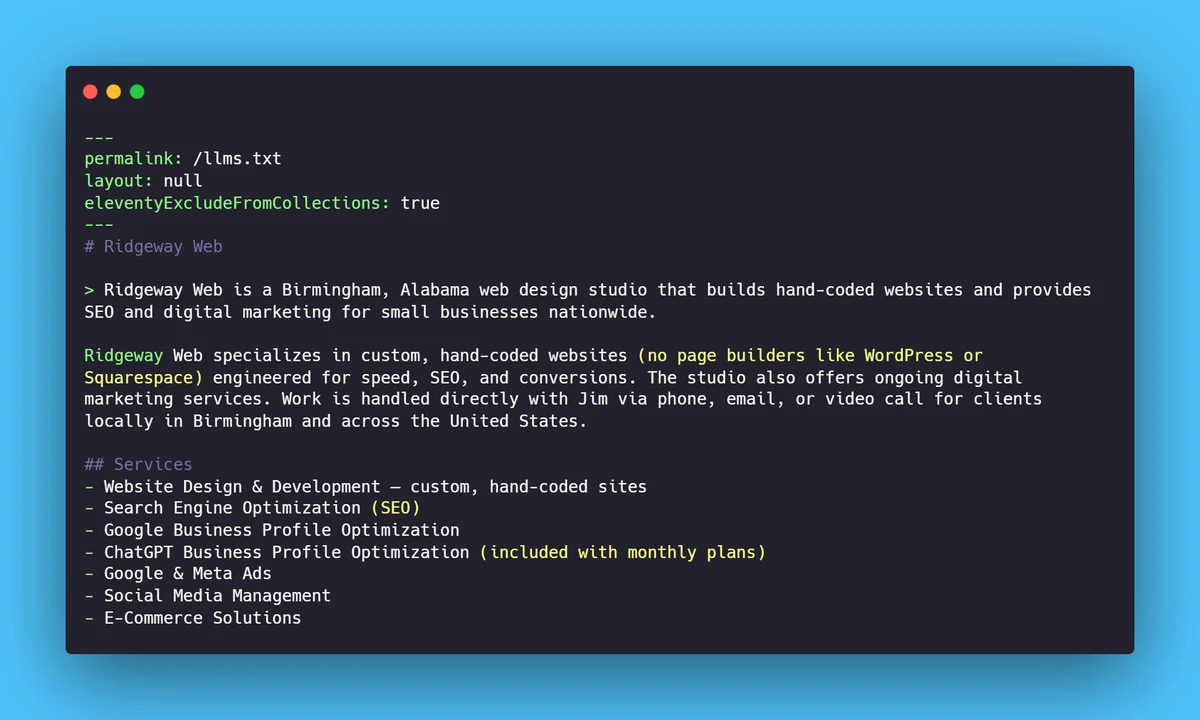
- An llms.txt file. A plain-text summary of your business, published at yourdomain.com/llms.txt and written specifically for AI tools: who you are, what you offer, what it costs and how to reach you. It's an emerging standard, and no major AI company has publicly confirmed that it reads these files yet. But it costs nothing to have, and it's ready if they do. Every website we build includes one, kept up to date automatically as you add services and blog posts.
If that sounds a lot like local SEO, that's because it is. The fundamentals that get you into Google's map pack are the same ones that get you into ChatGPT's answers. Our local SEO guide for Birmingham businesses walks through them.
Business Agents: An AI Sales Rep for Online Businesses
If you run a U.S. e-commerce store or an online service business with a website, you can also build a Business Agent. It's an AI assistant, labeled as yours, that answers shopper questions about your products, shipping and returns using the information and guidelines you give it.
When a shopper opens your profile, they can start a chat with your agent or head to your website. Conversations with your agent are clearly labeled, so customers know they've moved from ChatGPT's own answers to your business. OpenAI says it doesn't share users' conversations or agent chats with businesses.
OpenAI is also testing Sponsored Agents with a limited group of advertisers, which turns a ChatGPT ad into a direct chat with your agent. If you're already selling online, this is worth watching closely.
New for Ridgeway Web Clients: ChatGPT Business Profile Optimization
Starting today, ChatGPT Business Profile Optimization is included in every Ridgeway Web monthly plan, for all current clients and everyone who signs up from here on. No extra charge, no add-on to buy.
Getting started takes two steps on your end. OpenAI requires the business owner to claim and verify the profile personally, including a government ID check, so that part has to be you:
- Claim and verify your business in Business Hub, following the steps above.
- Invite jim@ridgewayweb.com as a Business Admin on your profile.
Once we have access, here's what we'll do for you:
- Fill out and optimize your profile so your description, services, hours and contact details are complete and match your website and Google Business Profile exactly.
- Keep it current. When your hours, services or contact details change, we update your ChatGPT profile along with your website and Google listing.
- Watch your Business Hub numbers and use the discovery topics to guide new content on your website.
- Set up your product feed or Business Agent if you sell online and qualify.
If you're already a monthly client, claim your profile and send the admin invite whenever you're ready, and we'll handle the rest. If you get stuck along the way, send us a message.
If you're not a client yet, this is a good time to talk. Our monthly plans include a custom hand-coded website, hosting, unlimited edits, SEO, and now ChatGPT profile management, all for one flat price. See what's included in our pricing, or look at how we handle Google Business Profile management and local SEO.
Frequently Asked Questions
Is it free to claim my business in ChatGPT?
Yes. Claiming a profile, managing it in Business Hub, and publishing a Business Agent are free at launch. OpenAI hasn't ruled out charging for some features later.
Do I need a special ChatGPT account?
You need a ChatGPT account and the authority to represent the business. OpenAI says you don't need a ChatGPT Enterprise agreement or an advertising account to claim a profile.
Will claiming my profile make ChatGPT recommend my business more?
Not directly. OpenAI says recommendations stay independent and claiming doesn't guarantee better placement. What it does is make sure ChatGPT has accurate information about you, and shows you how often you're being mentioned.
What if my business doesn't show up when I search in Business Hub?
You can enter your details to create a new listing. Beyond that, the best way to get ChatGPT to know about you is a clear website, a fully optimized Google Business Profile, consistent listings across directories, and steady reviews.
Is this the same as Google Business Profile?
It's similar in spirit: a free, verified listing you control. But it's a separate platform, and one doesn't replace the other. Your Google Business Profile is still essential, and keeping the two consistent helps both.
The Bottom Line
I expect a claimed, verified ChatGPT profile to become as standard as a Google Business Profile is today. Right now, most of your competitors haven't heard of it. Claim yours this week, make sure the details match everywhere else, and keep an eye on what Business Hub tells you.
If you'd rather have someone handle it, along with the website and local SEO that make it work, that's what we do. Get a free quote and let's make sure ChatGPT knows exactly who you are.