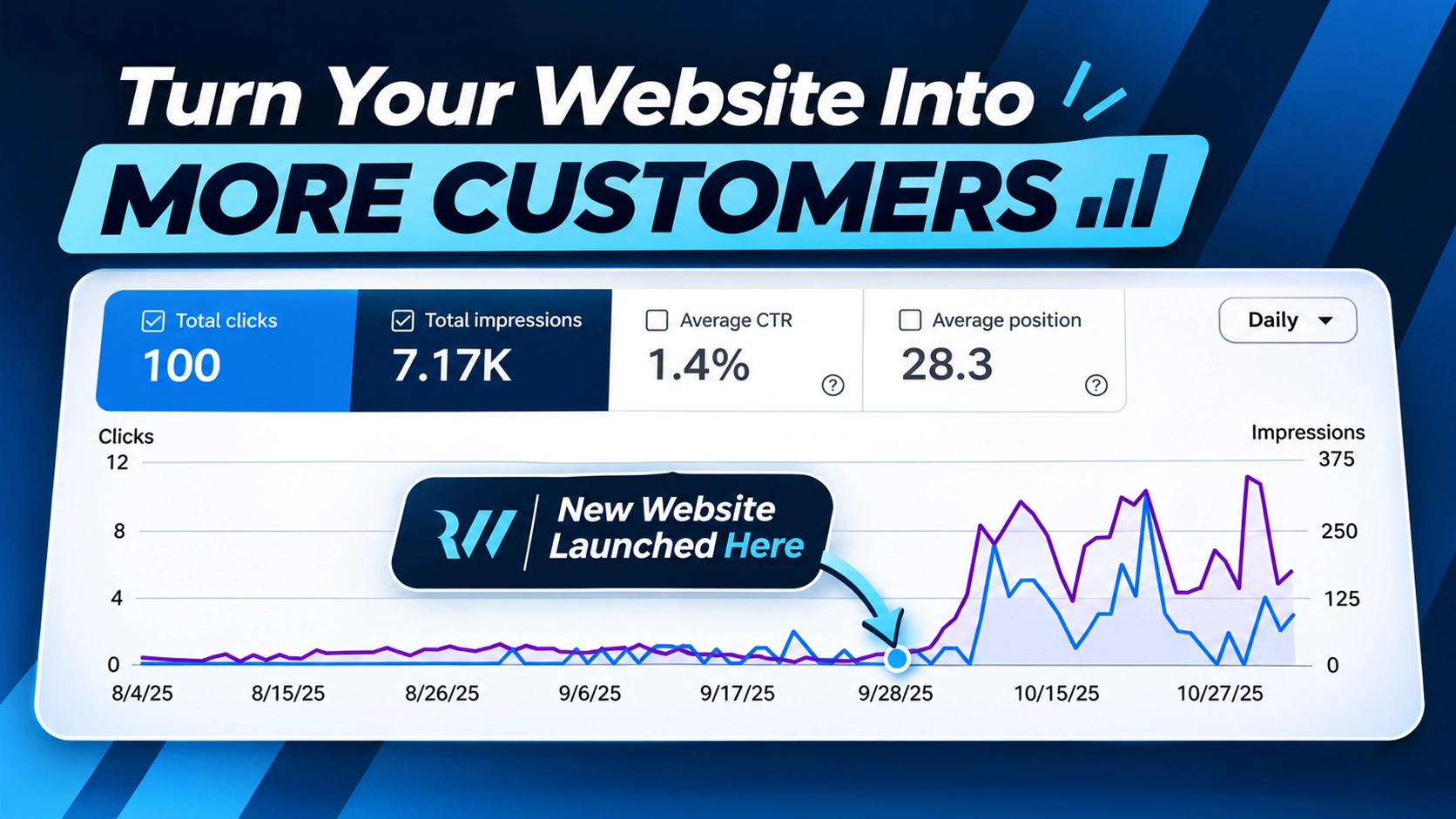
For two months, the Google Search Console chart for one small website looked like a flat line. It got a couple dozen impressions a day, at best, and most days not a single click.
Then we launched a round of fixes on October 5. Within a week, the line turned sharply upward.
If your website feels invisible, this is worth a read. The site in this story wasn't a big brand with a big budget. It was a small niche directory site with good information and a handful of hidden problems. I've left the business name out, but the numbers and changes below are real.
The Numbers
Here's roughly how the site's Google Search traffic changed:
| Before the changes | After the changes | |
|---|---|---|
| Impressions per day | About 10–30 | About 150–330 |
| Clicks per day | 0–1 | About 2–10 on most days |
| Pages on the site | 8 | 46 |
An impression means the site appeared in someone's Google results. A click means they chose it and visited.
Over the three months in the report, the site earned about 7,000 impressions and 97 clicks, and most of that came in the final month.
Before you picture a flood of customers, let me be straight with you. The site's average position is still around 28, which is roughly page 3 of Google. That's not the finish line. But the site went from being nearly invisible to being in the running, and that's the step that has to happen first.
What Was Wrong
None of these problems were visible to a normal visitor. The site looked fine, which is exactly why they went unnoticed for so long.
There were only eight pages
A site can't rank for searches it doesn't answer. With only eight pages, there simply wasn't much for Google to show. I wrote about the same issue in my McGrady Enterprises case study: the page that most specifically answers a search is the one with the best chance of winning it.
The page titles were vague
The homepage title was little more than the business name and a product name. It didn't say what the site offered or why anyone should click. Several other pages had short, generic titles like "About" and "Contact," and one blog post had a description that ran to more than 400 characters.
The images were far too large
The main homepage image was 265 KB, and the background used on most inside pages was 364 KB. Other images were oversized too, including a 269 KB picture displayed at just 32 pixels wide.
Small technical errors had piled up
- Every favicon address returned a 404 error, so the site's little browser-tab icon had never worked
- Blog posts had three H1 headings instead of one
- Some buttons were linked to nothing at all
- Social media previews used a tiny logo and a broken image path
- Images had useless descriptions like "icon" and "logo"
- There was no structured data to help Google understand the content
- The main listings table had malformed code
What We Changed
Fixed the foundation
We made sure every page, the sitemap, and the redirects all pointed to one address. Then we submitted the sitemap in Google Search Console. We also repaired the favicons, headings, and dead links.
Built pages for real questions
This was the biggest change. The site grew from 8 pages to 46, including:
- One complete main guide
- Focused how-to pages that each answer a specific question
- Location pages with information specific to each state
- An individual page for every listing in the directory
- Six new blog posts on topics the guides didn't already cover
The location pages were each written for that place. Pages that only swap in a different city name are a common shortcut, and they aren't worth much to a reader or to Google.
Connected the pages
Every new page links to related pages, so visitors have a clear next step and Google can see how everything fits together. Blog posts point to the guides, and the guides point back to them.
Rewrote titles and descriptions
Each important page got a title that says exactly what it offers, using the words people actually search for.
Made the site faster
We compressed and resized the images. That homepage image went from 265 KB to 31 KB, and the inside-page background went from 364 KB to 29 KB, with no quality loss I could see. We also stopped loading a script that most visitors never needed.
Added structured data
We added schema markup so Google can clearly identify the business, articles, FAQs, and page structure. We also built proper social previews, so shared links look professional.
What Actually Caused the Jump?
I want to be honest here, because not everyone in SEO is. Everything went live at about the same time, so I can't say exactly how much of the gain came from each change.
My read is that the new pages did most of the heavy lifting, because they gave Google far more searches to show the site for. The address fix likely helped Google trust and process those pages. The other improvements supported both.
The numbers also bounce around from day to day. That's normal while Google tests new pages. And SEO results vary by industry, competition, and timing, so nobody can honestly promise you a specific result.
What You Can Check on Your Own Site Today
- Check your address. Type your domain with and without "www." Both should land on the same version.
- Open Google Search Console. If it isn't set up, you're flying blind. It's free, and it shows the searches you appear for.
- Count your pages. Does each main service have its own page? If you serve several areas, does each one have useful, specific content?
- Read your page titles. Could a stranger tell what you do and where you do it?
- Run a speed test. Google PageSpeed Insights is free and will flag oversized images.
- Click everything. Check every button and link, especially on your phone.
Conclusion
This site didn't need a bigger ad budget to get moving. It needed its foundation fixed and more useful pages that answered what people were actually searching for.
Your website may have the same kinds of problems. They're easy to miss because the site looks fine from the front, while Google is seeing something very different.
That's the work I do at Ridgeway Web. I build and optimize websites for small businesses in Birmingham and across the country, and you'll always work directly with me. Take a look at my website design and local SEO services, or reach out for a free quote and we'll talk through what your site needs.